Sep 4, 2026FAQs
How to Fix a Dash Cam That Keeps Boot-Looping or Restarting
A dash cam in a constant restart loop usually points to power instability, media write failure, or thermal throttling. Follow this step-by-step diagnostic workflow to isolate the issue.
How to Fix a Dash Cam That Keeps Boot-Looping or Restarting
A dash cam in a constant restart loop usually points to power instability, media write failure, or thermal throttling. Follow this step-by-step diagnostic workflow to isolate the issue.
1. Power Supply Instability (Most Common)
Voltage drops or loose contact force the internal power circuit to reset repeatedly.
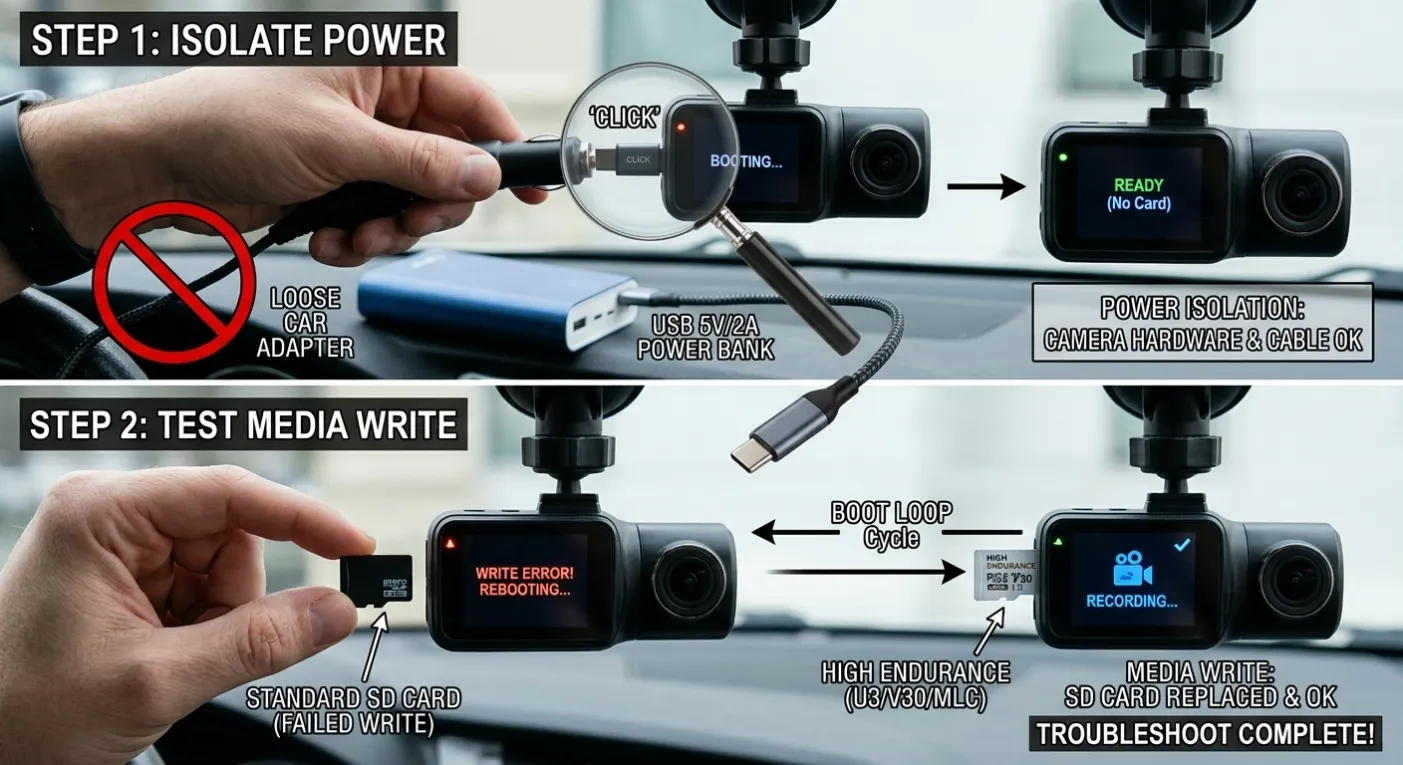
- Vehicle Power Connection: 12V cigarette lighter sockets can loosen over time under cabin vibration. Test with a direct hardwire kit or a known-good USB cable indoors.
- Capacitor / Battery Failure: Older cameras using internal lithium batteries fail to hold a charge over time, causing power failure during cold boot up. Supercapacitor-based units are immune to this, but their internal power management IC can still reboot if incoming voltage drops below specified thresholds (e.g., 11.6V cut-off).
- Truck/Commercial Voltage Fluctuation: Commercial vehicles with 24V systems can experience high voltage spikes during engine ignition. Ensure your power step-down module (24V to 12V/5V) includes built-in surge protection.
2. MicroSD Card Write Error
When a camera hits a bad block on a memory card during high-bitrate recording, the system controller can crash and trigger an auto-reboot.
- Quick Test: Pop the SD card out and turn the camera on. If the reboot loop stops and the camera prompts "Insert Card," the card is corrupt or degraded.
- Card Spec Bottleneck: Standard consumer cards (like standard Class 10/U1) cannot handle constant 2K/4K high-bitrate loop recording. Use high-endurance cards built with MLC or pSLC flash memory (rated U3/V30 or higher).
- Format Interval: Reformat the card in-camera at least once every month to clear file system fragmentation.
3. Thermal Throttling & Direct Sunlight
Windshields act as magnifying glasses. When internal temperatures exceed safe operating limits (typically 65°C–70°C / 149°F–158°F), the SoC triggers a safety shutdown or constant restart loop.
- Fix: Park in shaded areas or use sunshades. If thermal restarts happen frequently during standard operation, switch to a dash cam built with an aluminum heat-sink casing or active thermal management.
4. Corrupted Firmware or Config Files
A bad shutdown during past video writes can corrupt system configuration files on the firmware flash chip.
- Fix: Download the latest official
.binfirmware file to a clean, formatted SD card. Insert it into the powered-down camera and start it up to trigger a forced re-flash.
5. Hardware Degradation
If the camera reboots on a stable indoor power supply without an SD card inserted, the hardware has likely suffered component-level failure (such as a degraded mainboard PMIC, swollen capacitor, or cold solder joint caused by continuous high thermal stress).
Fast Diagnostic Checklist
Symptom | Primary Cause | Action Item |
Restarts immediately when engine cranks | Voltage drop under load | Check hardwire low-voltage protection setting |
Restarts every 3–5 minutes regularly | SD card write buffer crash | Remove card to test; swap to High Endurance U3 |
Restarts only on hot summer afternoons | Thermal overload | Verify supercapacitor status & sun shade use |
Restarts continuously on a loop logo | Corrupted firmware / Config | Perform forced SD card firmware flash |
Summary Checklist
Always test the unit without an SD card on a stable indoor power brick first. This instantly tells you whether you are dealing with a faulty memory card/power cable or a permanent hardware issue with the camera itself.