Jul 2, 2026FAQs
What Is OBD2 Power for Dash Cams?
What Is OBD2 Power for Dash Cams?
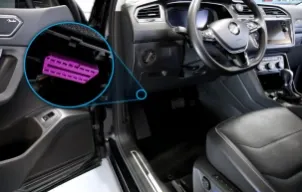
The OBD2 (On-Board Diagnostics II) port, located under most vehicles' dashboards, primarily serves diagnostics but also supplies constant 12V power (Pin 16). Specialized OBD2-to-USB or OBD2 hardwire adapters allow dash cams to draw power from this port, enabling continuous operation—including parking surveillance mode—without traditional hardwiring to the fuse box.
Advantages of Using OBD2 for Dash Cam Power
Easier and Faster Installation
Traditional hardwiring involves tapping into the fuse box, routing wires, and finding ACC (ignition-switched) and constant power sources—a process that can take hours and require tools. But with an OBD2 adapter: you can plug one end into the OBD2 port (usually under the dash near the steering wheel), then connect the other end (often USB or proprietary) to your dash cam, route the cable neatly along the headliner or pillars. The whole process takes under 10-15 minutes with no splicing or panel removal. It's ideal for renters, leased vehicles, or anyone avoiding permanent modifications.
More Stable and Reliable Parking Mode Monitoring
Parking mode activates impact detection, motion sensing, or time-lapse recording when the vehicle is off—crucial for capturing hit-and-runs or vandalism. The OBD2 port provides constant power in most vehicles, allowing the dash cam to stay active indefinitely (with safeguards). Many OBD2 adapters include built-in low-voltage cutoff (e.g., shutting off at 11.8-12.2V) to protect your battery. Compared to cigarette lighter plugs (which often lose power when the ignition is off), OBD2 ensures more consistent parking surveillance without needing a separate battery pack.
Frees Up the Cigarette Lighter Port
Many drivers use the cigarette lighter (12V outlet) for phone chargers, GPS units, or other accessories. Plugging a dash cam there occupies this valuable socket. OBD2 powering leaves the lighter port free for daily use, reducing cable clutter and allowing multiple devices.
Disadvantages of OBD2 Dash Cam Power
While convenient, OBD2 isn't perfect. Here are the main drawbacks:
Risk of Battery Drain
The biggest concern: The OBD2 port delivers constant power even when the car is off in nearly all modern vehicles. If your dash cam runs in full parking mode without proper safeguards, it can slowly drain the battery—especially if the car sits unused for days or weeks. Real-world reports show drains after 3-7 days without driving, potentially leaving you stranded. Even with low-voltage cutoff, aggressive parking modes (e.g., continuous recording) increase risk. Always choose adapters and cams with reliable voltage protection.
Not All Vehicles Keep OBD2 Powered When Parked
While most cars maintain constant OBD2 power, some (especially certain electric vehicles like Ford Mustang Mach-E or Hyundai Ioniq) may shut off the port after a period to conserve battery. In these cases, parking mode won't work reliably via OBD2, forcing a switch to hardwiring or external batteries. Check your vehicle's manual or test the port with a multimeter when the ignition is off.
Is OBD2 Right for Your Dash Cam?
OBD2 powering is an excellent middle ground for most drivers: much easier than hardwiring, with better parking mode than a cigarette lighter plug, and no occupied outlets. It's especially great if you want quick setup and reliable surveillance without professional installation. However, if you frequently park for long periods or drive an EV with power-saving features, consider hardwiring or a dedicated dash cam battery pack to minimize drain risks.